
Features

Six capabilities, one continuous workflow

From one sentence to a calculation report, the path runs through modeling, solving, post-processing, AI, reporting and codes. Each works on its own, and each states its limits — including what it cannot do.

01Modeling

Modeling — points, lines, surfaces, extrusion, plus 6 structural templates

Common practice

Building a 3-span, 2-storey portal frame in a general-purpose CAE takes over 200 clicks; change one span and all that work goes to waste.

How Kavvo does it

Geometry
Points / lines / planar polygons / extrude into shells / copy · mirror · array · move · rotate · scale
Import
DXF grids (LINE / LWPOLYLINE), project JSON
Templates
Portal frame · continuous beam · truss · space frame · space truss · arch

Technical notes

  • Geometry merged with a 1e-6 tolerance; overlapping nodes are merged automatically
  • Templates are generated parametrically: change a span and the model recomputes — no rebuilding
  • The geometry-layer interface follows an OCCT-style design, so solid modeling in v2 requires no changes upstream
02Solve

Solve — current kernel OpenSees, 5 analysis types

Common practice

Writing your own solver takes a decade; driving OpenSees means memorizing TCL. Either way, you're stuck.

How Kavvo does it

Analysis types
Static · modal · buckling · pushover · time-history
Solver controls
Convergence criteria, step size, iteration limits, parallel load cases

Technical notes

  • 99.99% of the computation runs in the C++ kernel; Python only orchestrates (0.0003% of runtime) — none of the 'Python-based CAE is 10× slower' penalty
  • Subprocess isolation: if the solver crashes, the UI doesn't — and your model is safe
  • After every solve, automatic ΣF / ΣM residual checks plus displacement and stress magnitude sanity checks; anomalies are flagged prominently
03Post-processing

Post-processing — force diagrams, contours, mode shapes, time histories

Common practice

The analysis finishes and you don't know how to read it; contour colors have no convention, and signs have been mixed up before.

How Kavvo does it

Graphics
Deformation · internal force diagrams N/V/M/T · stress contours · mode shape animation · time-history curves · inter-storey drift ratios · legends
+−
Section stress contour. The color scale follows the Chinese convention — tension / positive = red, compression / negative = green — driven by the same design tokens as the desktop app, never hard-coded per client.

Technical notes

  • Result color maps follow the Chinese convention: positive / tension / heating = red, negative / compression / cooling = green; the international edition switches at the token layer, never hard-coded per client
  • Constraint red and load orange are a separate set of semantic colors, never mixed with contour color scales
  • The .stres index layer cuts extreme-value queries from 1,879 ms to 0.6 ms; result size drops from 1,440 MB to 72.7 MB
04AI

AI — a copilot, not autopilot

Common practice

The biggest fear with AI modeling tools is 'it changed something and you don't know what.' Once a black box makes a mistake, engineers stop trusting it.

How Kavvo does it

Tool gateway
execute_script · get_tool_schema · screenshot · run_analysis · query_model · guide
Model choice
Local: Ollama / LM Studio / vLLM — data never leaves your machine, zero cost. Cloud: DeepSeek / Tongyi / Kimi / OpenAI / Claude with your own keys. No AI at all: model manually, with every other feature unaffected.
Key security
Keys are encrypted in the OS keychain (Windows DPAPI / macOS Keychain) — never uploaded, never logged, never stored in .lintel project files

Technical notes

  • Visible: every AI operation shows which function it called and with what parameters
  • Reversible: one-click rollback; take over anytime by switching to manual editing or TCL scripting
  • The AI only gets 7 meta-tools; everything else works by 'look up schema → write a Python snippet → batch-call tools', not by letting the model click buttons
  • Generated models automatically run the checker: orphan nodes, duplicate nodes, zero-length elements, unrestrained DOFs, unassigned sections, floating loads — red lights block solving
05Report

Report — HTML / DOCX dual format, 10-chapter structure

Common practice

After solving you still assemble Word by hand — pasting figures, retyping tables, fixing layout, two hours per report; when the client revises, you start all over.

How Kavvo does it

Chapters
Cover (project / date / version fingerprint) → model sketch → section and material tables → load schedule → load cases and combinations → internal force envelopes (tables and diagrams) → displacements and inter-storey drift → modal results → code check summary → appendix (full TCL input)

Technical notes

  • One intermediate structure renders both outputs: HTML ready for browser and print, DOCX fully editable
  • Templates are swappable: cover style / chapter selection / unit system
  • Check pages force-print the code edition in the footer (e.g. AISC 16th / EN 2005+A1)
06Codes

Multi-country codes — GB / AISC / Eurocode, pluggable

Common practice

Chinese software doesn't travel overseas; foreign software doesn't recognize GB. Firms doing international projects end up buying both.

How Kavvo does it

GB
GB/T 11263, GB/T 706 and more — about 300 sections compiled from public standard tables
AISC
AISC Manual 16th, data taken from the open-source steelpy library (MIT), including Zx plastic moduli
Eurocode
EN 1992 / 1993 / 1997, taken from blueprints (MIT)
Custom
Parametric entry with section properties computed automatically

Technical notes

  • A code package = section table data + material grades + load combination rules + check item references — data, not hard-coded logic
  • Adding JIS / AS is just another package; no kernel changes needed
  • The section selector filters by the currently active package; units follow the package
  • Every data source is individually attributed; GB tables are compiled from public standards and the current edition always governs

Technical specs

Everything v1 supports, in one table

This table lists only what v1 ships. Capabilities that already exist in the kernel but are not yet wired into the UI are listed separately at the end of each group — never mixed in to pad the count.

  • Geometry and meshing

    • Points / lines / planar polygons / extrusion into shells
    • DXF grid import (LINE / LWPOLYLINE)
    • 6 parametric templates: portal frame · continuous beam · truss · space frame · space truss · arch
    • Automatic node merging with a 1e-6 geometric tolerance
    • Automatic division of beam-column line elements · triangular / quadrilateral shell meshes

    In the current kernel, pending UISTEP / IGES solid import · Structured hexahedral meshing · Boolean operations and solid modeling

  • Element library

    • Elastic beam-columns (with shear deformation)
    • Fibre-section beam-columns
    • Plastic-hinge beam-columns
    • Truss members
    • Layered / fibre shells
    • Zero-length springs and bearing elements

    In the current kernel, pending UISolid elements (8 / 20 nodes) · u-p two-phase elements (liquefiable sites) · Contact and interface elements · Viscous and friction dampers

  • Material constitutive models

    • 68 uniaxial models (7 groups: elastic / hardening / concrete / steel / friction / hysteresis / viscous)
    • 23 multiaxial models (including Drucker-Prager, Cam-Clay)
    • Every model documents what each parameter means, where values come from, and what you will see if you get it wrong

    In the current kernel, pending UIUser-defined constitutive interface

  • Analysis types

    • Static
    • Modal (eigenvalue)
    • Linear buckling
    • Pushover (displacement-controlled / force-controlled)
    • Direct-integration time history
    • Batch multi-case runs

    In the current kernel, pending UIMulti-support excitation · DRM domain reduction (seismic wave input) · Soil–structure interaction

  • Solving and parallelism

    • UmfPack sparse direct solver (default)
    • BandGeneral / ProfileSPD alternatives
    • Adjustable convergence criteria, step size and iteration limits
    • OpenSeesMP multi-case parallel solving

    In the current kernel, pending UIMUMPS (OpenSeesMP only) · PARDISO · AMG iteration (large near-incompressible models)

  • Post-processing and output

    • Deformed shapes · force diagrams N / V / M / T
    • Stress contours (tension red, compression green) · mode-shape animation · time-history curves
    • Inter-storey drift ratios
    • .stres result store (three-layer HDF5, extreme-value queries in 0.6 ms)
    • HTML / DOCX calculation reports, 10-chapter structure

    In the current kernel, pending UIFibre-section stress distributions · Gauss-point data extraction · Python scripting interface

"In the kernel" means the capability ships in the official OpenSees 3.7.2 distribution but the Kavvo UI does not expose it yet; these follow the M2–M5 milestones with no promised dates. The v1 scope is governed by the M1 acceptance checklist — anything that has not passed acceptance does not appear above.

Real results

This is what post-processing looks like — and the numbers are real

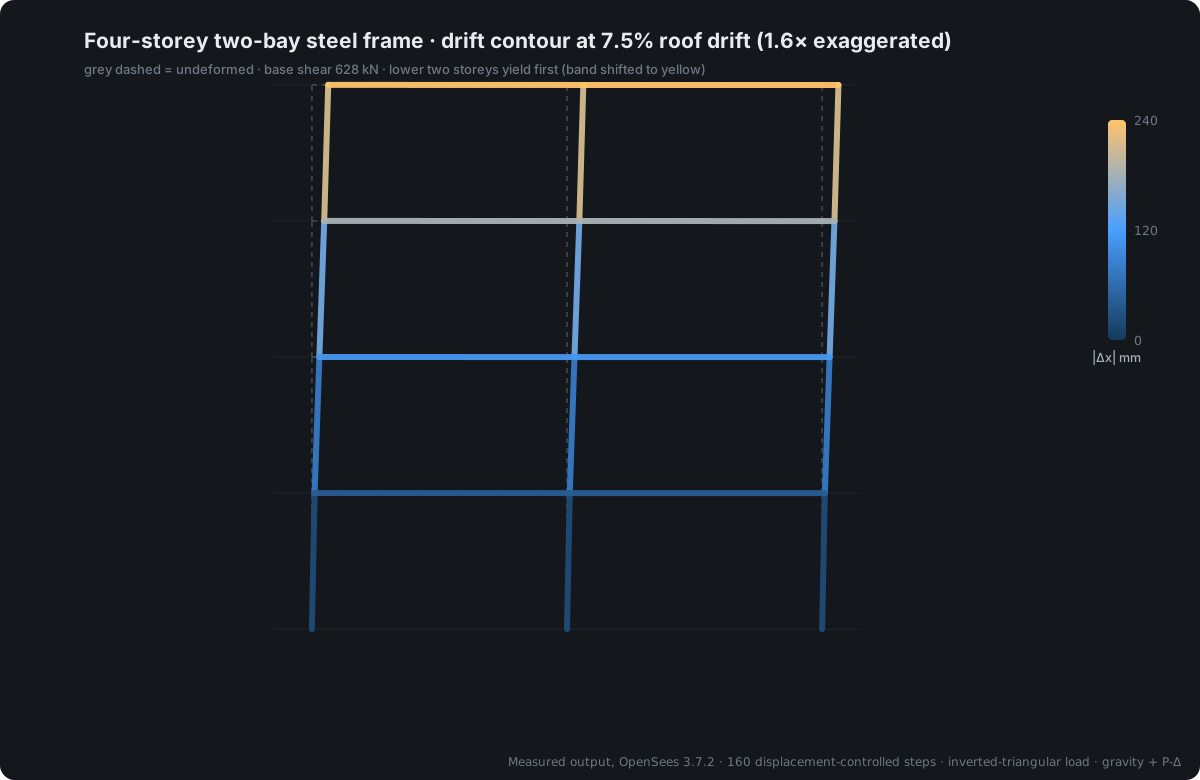
The drift contour below is the actual result of a four-storey two-bay steel frame pushed over to 7.5% drift — not a rendered illustration. The deformation scale factor, the color legend and the yield sequence are all written into the figure, so a screenshot can go straight into a calculation report.

The model file for every case is public — recompute it from the command line and check the numbers yourself.

Drift contour of a four-storey two-bay steel frame under pushover, real OpenSees output
Four-storey two-bay steel frame · pushed to 7.5% drift · base shear 628 kN

Material library · Open handbook

Material library: 91 constitutive models, each documented on how to fill it in

Material selection is the most error-prone step in modeling — the wrong layer (uniaxial where multiaxial was needed), the wrong value (cube strength where cylinder strength belongs), the wrong units (steel modulus entered as 206000 instead of 200). So the library isn't just '91 names': for every material, what each parameter means, where values come from, and what you'll see when you get it wrong is documented in a public, always-available handbook.

  • 68types
    Uniaxial materials
    7 groups: elastic / hardening / concrete / steel / friction / hysteresis / viscous and more
  • 23types
    Multiaxial materials
    For solid and shell elements, including Drucker-Prager, Cam-Clay and more
  • 4docs
    Handbook documents
    Overview / steel / concrete / selection & complete list
Material libraryParameter tables for the ten most-used materials: symbol, meaning, unit, and what you'll see when it's wrongOpen →

These four documents are the same files the desktop AI reads — ask 'how do I fill in concrete parameters' in the software and this is exactly what it cites. The handbook was written independently from public literature (Menegotto-Pinto, Mander 1988) and code-based value methods; it is not a translation of the official OpenSees documentation. Material type names are generic identifiers — check the official documentation for the official parameter order.

Install it and try it

The free tier unlocks every feature — no charge below 5,000 elements per model. Modeling, analysis, post-processing, reports, code packs and TCL export are all usable.